Your Webflow store, your books, reconciled.
Native Webflow to Xero and QuickBooks. Every order posts as a balanced invoice, refunds become credit notes, and nothing reaches your books unless it reconciles to the cent. No Zapier, no per-task fees.
14-day free trial · no card for your first 100 synced orders
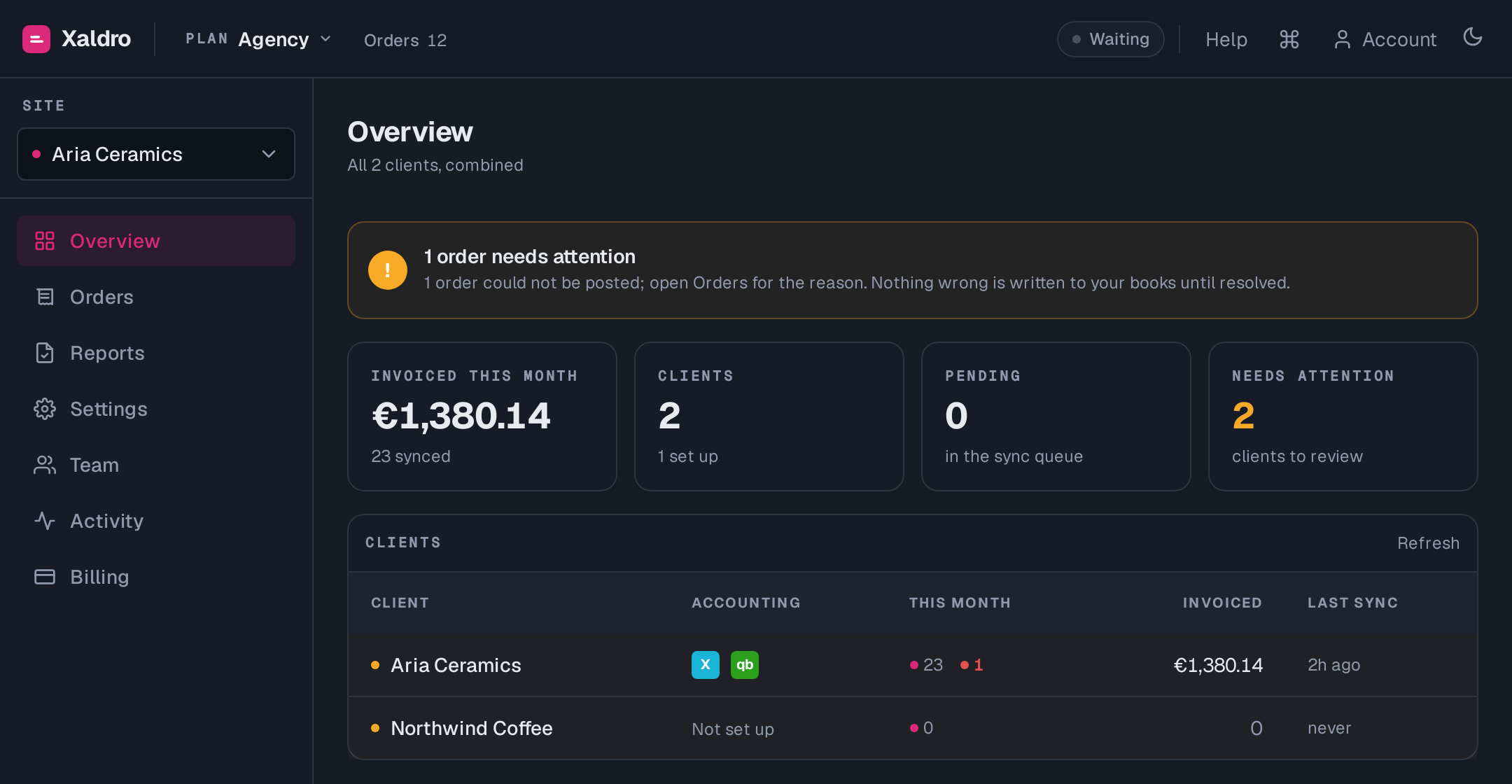
The actual dashboard. Not a mockup.
Connects the tools you already run your store on
 Webflow
 Xero
Xero
 QuickBooks
The problem
Webflow sells. Your books do not find out.
Webflow Ecommerce takes the money beautifully, then leaves the accounting entirely to you. Here is what that actually costs.
Re-keying every order by hand
Each Webflow sale gets retyped into Xero or QuickBooks, or dumped to a CSV that never maps cleanly. Hours a month, and one typo away from books that do not tie out.
Zapier and Make quietly break
The no-code workarounds flatten multi-line orders, drop shipping and tax, and double-post on retries. You find out at month-end, when the reconciliation refuses to balance.
Refunds and cents go missing
Refunds never make it back to the ledger. Totals drift by a few cents. Closing the month becomes a hunt for why the numbers disagree.
Why Xaldro
Books you do not have to re-check by hand
Four things that decide whether your accounting actually reconciles, and that the no-code workarounds get wrong.
The invoices are yours. Forever.
Every order posts as a real invoice inside your own Xero or QuickBooks organisation. Uninstall Xaldro and nothing disappears, your books are untouched. This is a real integration, not a hostage situation.
Reconciled to the cent
Before anything posts, Xaldro checks the invoice total equals what the customer actually paid. If a number is off, the order is held with a clear reason instead of quietly posting wrong.
Refunds become credit notes
Refund an order in Webflow and Xaldro automatically posts a matching credit note in Xero or a credit memo in QuickBooks, allocated against the original invoice.
Never double-posts
One order, one invoice per system, keyed for idempotency. Retries and duplicate webhooks never create a second invoice. Order edits after posting are flagged, never silently changed.
See the actual app
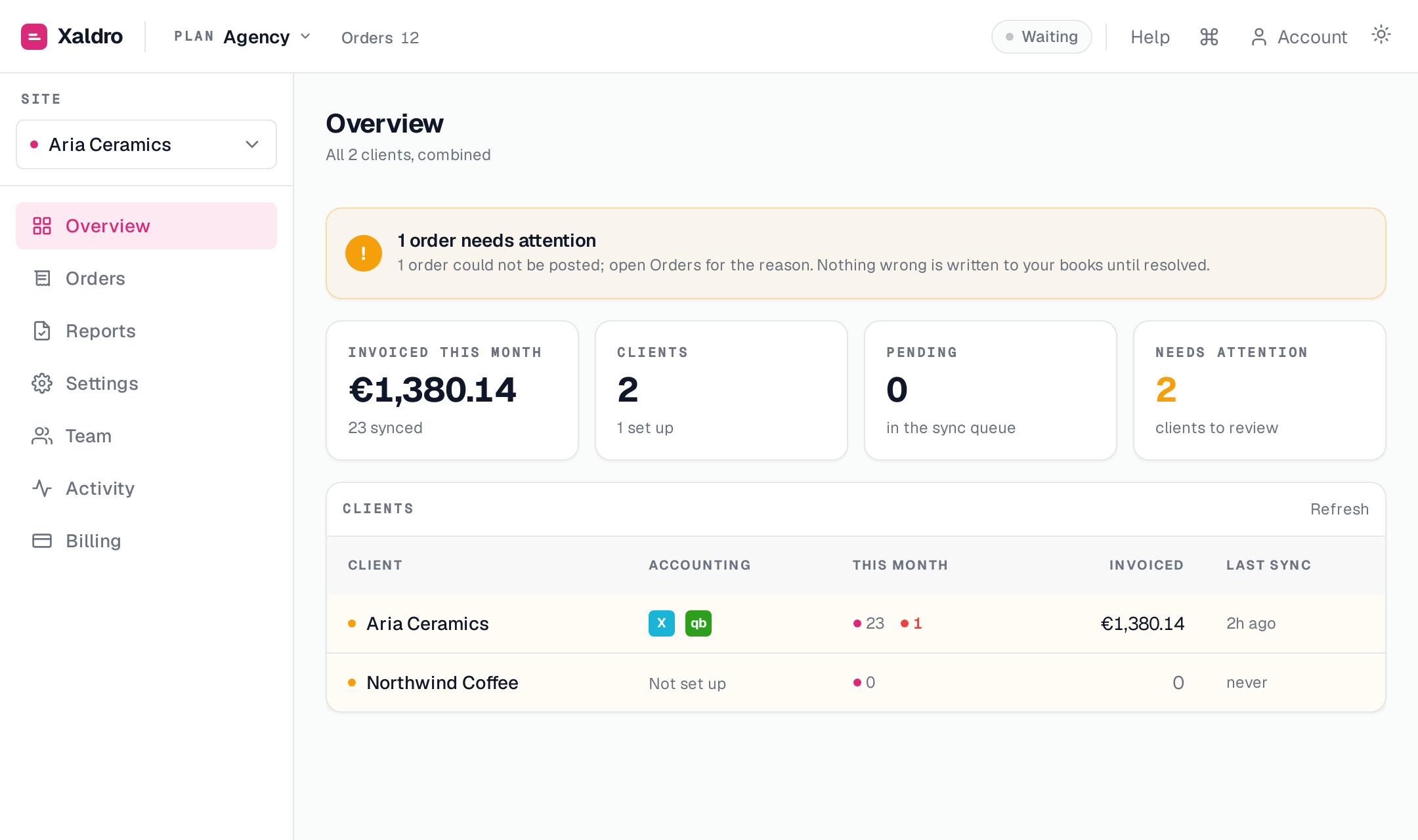
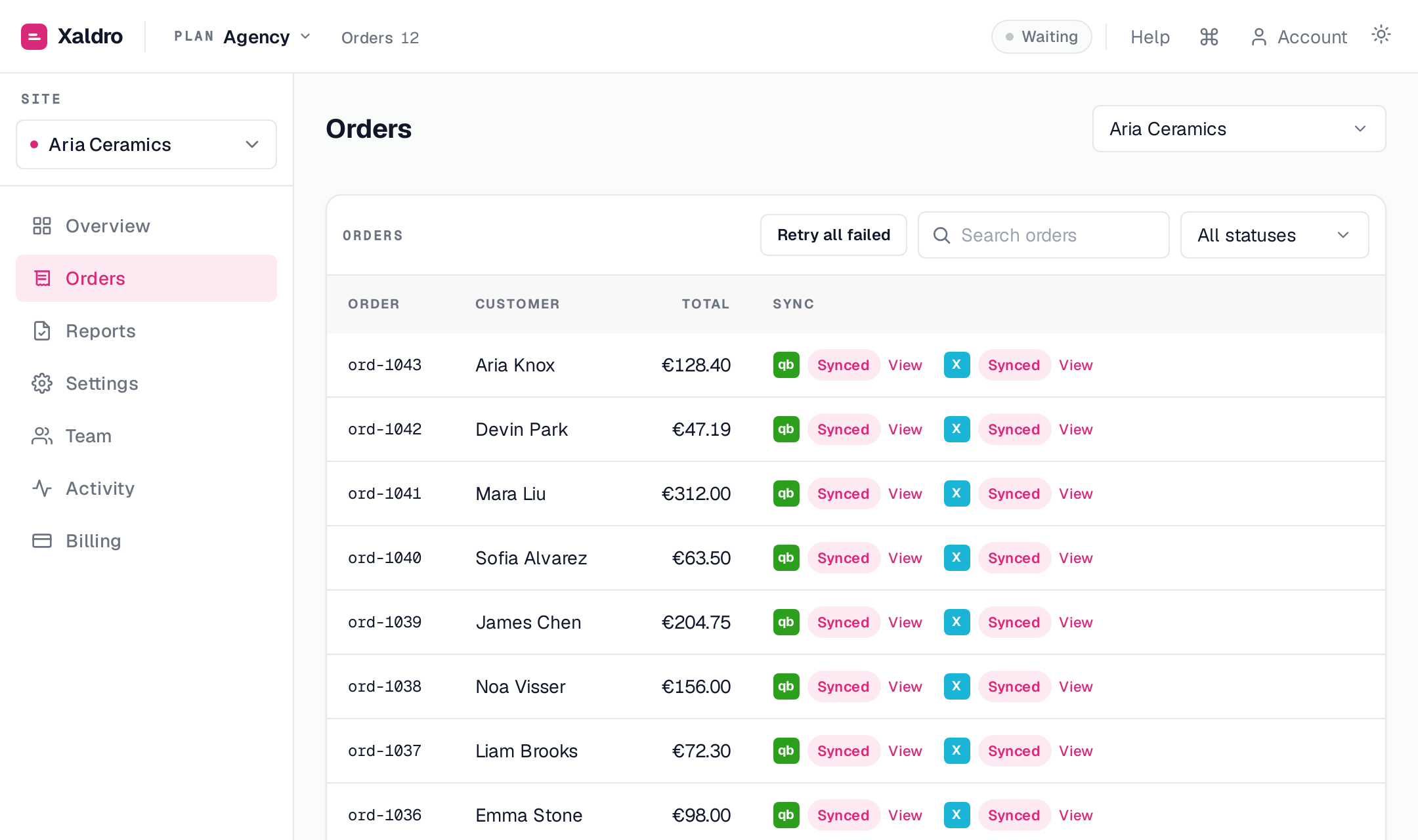
One dashboard for every order and every client
Real screenshots of the running product. Sync status you can trust at a glance, and one click to fix anything that needs it.
How it works
Connect. Map. Done.
Set up takes minutes. After that, orders post themselves and you only ever touch the exceptions.
Install on your store. We read ecommerce orders, no Designer changes, no code.
Authorise your ledger. Map revenue, shipping, payment and tax accounts once.
New orders become balanced invoices automatically. The last 90 days are backfilled on install.
For agencies & bookkeepers
Run every client's books from one place
Manage a portfolio of Webflow stores without a tab per client or a login per ledger. Xaldro keeps each set of books separate and correct.
See the Agency planThe honest comparison
vs Zapier & Make
Including where the workarounds technically work. See the full breakdown.
| Feature | Xaldro | Zapier | Make |
|---|---|---|---|
| Native Webflow to Xero / QuickBooks | ✓ | ~ | ~ |
| Multi-line-item orders mapped correctly | ✓ | ✕ | ~ |
| Invoice total always reconciles to the cent | ✓ | ✕ | ✕ |
| Refunds as credit notes / credit memos | ✓ | ✕ | ~ |
| Shipping and discounts as their own lines | ✓ | ✕ | ~ |
| Never double-posts an order | ✓ | ✕ | ✕ |
| Flat, predictable pricing | ✓ | ✕ | ✕ |
| Manage multiple client books | ✓ | ~ | ~ |
Security & trust
It touches your books, so it is built to be careful
Official connections, least-privilege access, and your data yours to take back at any time.
Official OAuth, no passwords
You connect Webflow, Xero and QuickBooks through their own secure sign-in. Xaldro never sees or stores your accounting password.
Read-only on Webflow
We request just enough scope to read orders. Xaldro cannot change your store, your products or your customers.
Encrypted tokens, no card data
Connection tokens are encrypted at rest with AES-256-GCM. Card numbers never touch Xaldro, payments stay with Webflow and Stripe.
EU-hosted, GDPR-ready
Data lives on EU infrastructure with a signed DPA available. Export or delete everything from Settings whenever you want.
Pricing
Flat pricing. No per-task fees.
14-day free trial. No card required for your first 100 synced orders.
Starter
A single store getting started.
- ✓ 100 orders / month
- ✓ 1 site
- ✓ Xero or QuickBooks
- ✓ 1 seat
- ✓ Refund auto-sync
Growth
Growing stores using both ledgers.
- ✓ 500 orders / month
- ✓ 2 sites
- ✓ Xero and QuickBooks
- ✓ 3 seats
- ✓ Refund auto-sync
Pro
High volume, multiple stores.
- ✓ Unlimited orders
- ✓ 5 sites
- ✓ Xero and QuickBooks
- ✓ 10 seats
- ✓ Priority support
Agency
Agencies managing client books.
- ✓ Unlimited orders
- ✓ Unlimited sites
- ✓ Xero and QuickBooks
- ✓ 25 seats
- ✓ Priority support
No lock-in. Your invoices live in your own Xero or QuickBooks, forever. Cancel anytime and keep every one.
Why we built Xaldro
Webflow Ecommerce is great at selling and silent about your books. Webflow declined to build the accounting bridge, and the Zapier workaround breaks on the first multi-line order. We were tired of re-keying invoices and hunting cent-level mismatches at month-end, so we built the native, reconcile-first sync we wanted: your invoices, in your own ledger, correct to the cent.
The Xaldro team
From the blog
We write about this every week
How to connect Webflow Ecommerce to QuickBooks Online and sync every order
Connect your Webflow store to QuickBooks Online, map your accounts once, and every order posts automatically as a balanced invoice in your own QuickBooks company. Here is exactly how it works, what maps to what, and how to keep it reconciled to the cent.
Jul 10, 2026 GuidesWebflow Ecommerce bookkeeping: a practical guide to keeping the books right
Selling on Webflow is the easy part. Keeping the books right, orders as invoices, refunds as credit notes, payouts reconciled, tax correct, month-end clean, is where it gets real. Here is the whole picture in one place.
Jul 10, 2026 GuidesGetting Webflow sales tax and VAT into Xero and QuickBooks correctly
Tax is where Webflow-to-accounting setups quietly go wrong. Here is how Webflow tax maps into Xero and QuickBooks, how per-region rates work for US sales tax and EU VAT, and why the invoice tax must match the order to the cent.
Jul 10, 2026Questions
Does it survive if I uninstall?
Yes. Invoices, contacts and credit notes live inside your own Xero or QuickBooks organisation. Removing Xaldro never touches your books.
Do you charge per order or per task?
No. Pricing is a flat monthly tier based on order volume. There are no per-task fees like Zapier or Make.
Is my financial data safe?
Yes. You connect through official OAuth, so we never see your accounting password. Connection tokens are encrypted at rest, we hold read-only access to Webflow, and card data never touches Xaldro. Everything is EU-hosted with a DPA available.
What happens to historical orders?
On install we backfill the last 90 days of orders so your books are caught up, then keep syncing in real time via webhooks.
Can I try it without risking my books?
Yes. You set the account mappings before anything posts, and the reconcile-to-the-cent guard holds any order that does not add up instead of posting it wrong. Point it at a Xero demo company or a QuickBooks sandbox first if you want to watch it work.
Will it ever double-post an invoice?
No. Every order maps to exactly one invoice per accounting system, with idempotency keys so retries never create duplicates.
How is sales tax handled?
Pick a default tax rate in Settings and Xaldro applies it to every order, then checks the invoice total matches what the customer paid to the cent. Selling into more than one region? Add per-region rules that map each destination to your provider's tax code. Xaldro applies the code you map, it is not a tax-filing service.
What if I do not use Xero or QuickBooks?
Those are the two systems Xaldro supports today. If you run something else, tell us on the contact form. We prioritise new integrations by demand.
Can I manage more than one store?
Yes. Connect multiple Webflow sites, each with its own account mappings, and switch between them from one dashboard. Growth and up include team seats.
Where is my data hosted?
On EU infrastructure, GDPR-ready. We store order metadata to drive the sync and keep an audit trail.
Got a Webflow store with orders?
Let's get your books in sync.
Tell us about your store and we will help you get set up, or just start the free trial and connect your ledger in minutes.
14-day free trial · no lock-in · your invoices stay in your books, forever