Managing one Webflow store’s books is a chore. Managing ten is a business, and most of the tools agencies reach for were built for a single store owner, not for a firm carrying a portfolio. The result is a familiar mess: a separate integration per client, a bill that climbs with every order across every account, and a month-end that turns into a full re-audit because you can never quite trust that everything posted cleanly.
This post lays out a workflow that scales. No per-client Zap to babysit, no per-task fee that punishes you for growing, and a month-end that fits in a morning.
The real pain of a Webflow client portfolio
The hard part of agency bookkeeping is not any single store. It is the switching cost and the uncertainty across many stores.
- Every client has a different chart of accounts, different tax treatment, and often a different accounting system entirely.
- Orders, refunds, shipping, and fees all have to land in the correct ledger for the correct client, every time.
- You are accountable to each client for numbers that have to reconcile exactly, but you rarely have time to check each one line by line.
- More than one person on your team touches the books, and you need to know who did what.
The tools built for a solo store owner ignore all of this. They assume one store, one accounting file, one person. Run that model ten times over and you get ten fragile automations and no single place to see whether the portfolio is healthy.
One overview, every client’s detail underneath
The first shift is moving from “one automation per store” to one overview across the whole book of business.
You open a single combined Overview and see the state of every client at once: which stores are reconciled, which have orders waiting, and which need attention. From there you drill into any one client for the per-site detail: its orders, its mappings, its recent activity, its exceptions.
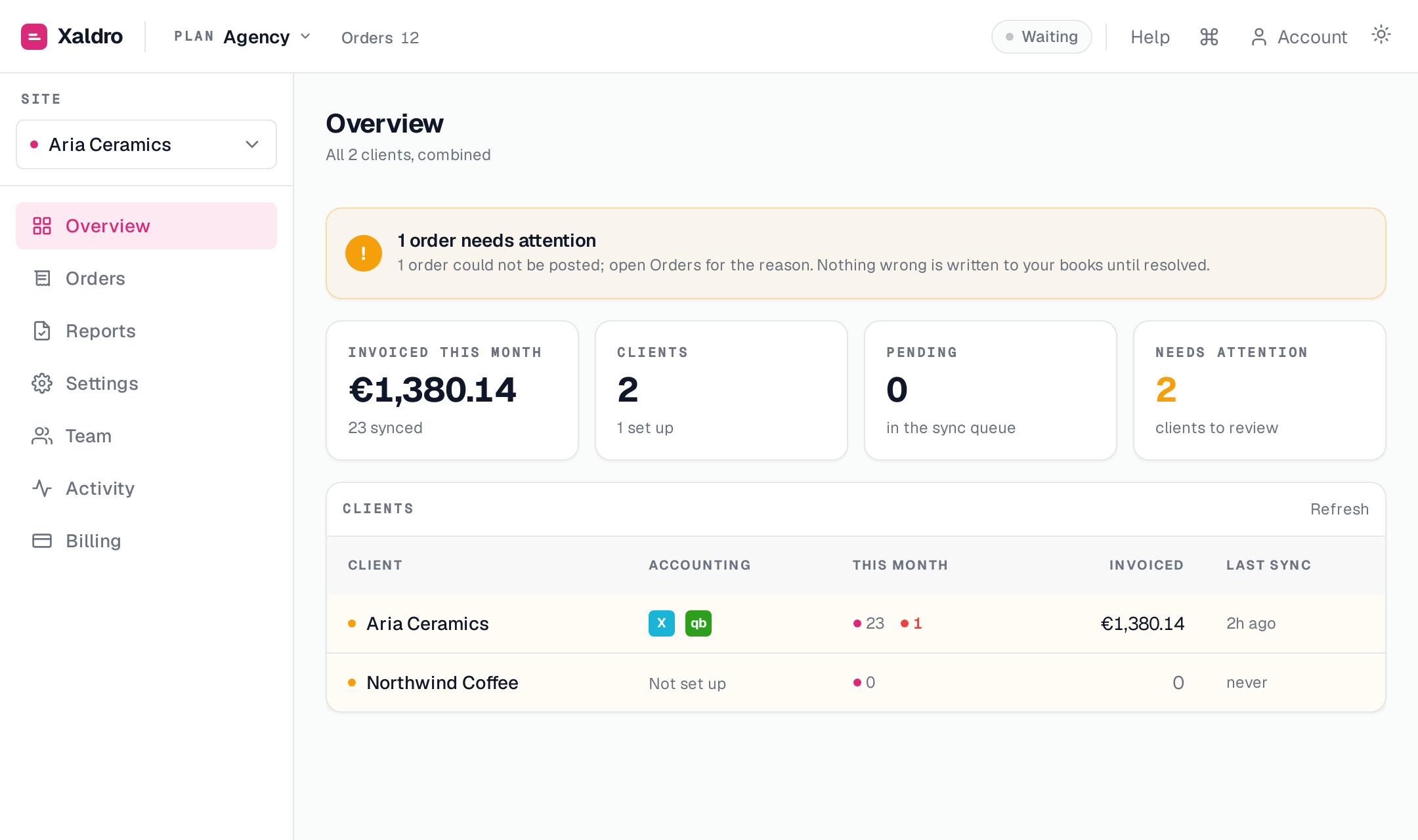
That combined view is what makes a portfolio manageable. Instead of logging into ten dashboards to find the one thing that broke, you scan a single list and go straight to it.
Each client posts to their own Xero or QuickBooks organisation
This is the point most tools get wrong, and it matters more than anything else.
A client’s orders must post to that client’s own books. Not a shared agency ledger, not a catch-all file you reconcile later. With Xaldro you connect each Webflow site and pin it to that specific client’s own Xero or QuickBooks organisation. Site A’s orders flow into Client A’s Xero. Site B’s orders flow into Client B’s QuickBooks. They never cross.
That per-client pinning gives you a few things that a shared setup cannot:
- Revenue, shipping, payment, and tax accounts are chosen per client, matching each client’s chart of accounts exactly. One client’s revenue posts to Sales, another’s to Online Sales, and both are correct.
- Xero and QuickBooks live side by side across your portfolio. You are not forced onto one system for every client just because your tool only speaks one.
- Tax is handled per client, because their jurisdictions and codes differ.
- Refunds are not an afterthought. A refund in Webflow auto-posts as a credit note in Xero or a credit memo in QuickBooks, in the right client’s books, so returns do not quietly break a client’s reconciliation.
Because each client’s data lives in their own accounting organisation, it is theirs. If a client leaves, or you stop using Xaldro entirely, the posted transactions stay in their Xero or QuickBooks and survive the uninstall. You are not holding their books hostage inside a middle layer.
Reconcile to the cent, so month-end is a short list
The reason agency month-end takes so long is trust. If you cannot trust that everything posted correctly, you have to check everything, and checking ten clients line by line is where the weekend goes.
Xaldro is built the other way around. Orders reconcile to the cent, so anything that did post is known to be right. Anything that could not post cleanly surfaces as an exception with a reason attached. That turns month-end from an audit of everything into a short list of explained exceptions.
A concrete example of an exception you will actually hit across a portfolio, because we hit it in testing: each client’s ledger has its own base currency. We ran one order that posted cleanly into a client’s USD QuickBooks but was held for a different client’s EUR Xero, because that organisation did not have multi-currency turned on. The point is not the currency itself; it is that the held order names the exact client and the exact reason, so you fix that one client’s setup rather than discovering a silent gap weeks later.
The practical effect: the “needs attention” list is your entire to-do list. If it is empty, you are done. If it has three items, you have three things to do, and each one tells you why it is there.
A realistic month-end
Here is what closing the month actually looks like across a portfolio:
- Open the combined Overview. Most clients show reconciled and balanced.
- Look at the “needs attention” list. This is the whole job for the day.
- For each flagged item, read the reason. It might be an unmapped account on a new product, a tax code that needs picking, or a transient error that needs a retry.
- Fix the mapping, pick the code, or retry the order. The exception clears.
- When the list is empty, the portfolio is closed.
No hunting through failed-task logs. No re-checking clients that were already fine. The system tells you the exact set of things standing between you and a clean close.
Team roles: owner versus member
Bookkeeping across a portfolio is rarely a solo job, and sharing one login is not a real answer. Your team needs their own access, and the account needs guardrails around the actions that carry consequences.
Xaldro splits this into two roles.
Members do the day-to-day work. That covers the operational bookkeeping across clients:
- Setting up and adjusting account mappings and rules.
- Retrying orders that need it.
- Disconnecting a site when a client’s setup changes.
The owner keeps control of the actions that should never be casual:
- Billing and the subscription.
- Managing the team, inviting and removing people.
- Removing a site from the account entirely.
- Deleting or clearing the activity log.
So a bookkeeper can run the actual books all month without ever being able to touch billing, evict a client’s site, or wipe the record of what happened. That separation is what lets you hand real work to a larger team without handing over the keys.
A tamper-proof audit trail
When several people work the same portfolio, “who changed this client’s mapping” cannot be a guessing game.
Every action in Xaldro is recorded in an append-only Activity log, attributed to the person who did it. Changed a tax mapping, retried an order, disconnected a site: it is all there with a name against it.
The log is append-only for a reason. Members can read it but cannot edit or clear it. Only the owner can clear it. That makes the record trustworthy. When a client asks why a number moved, or when you review a teammate’s work, you have an honest, complete history rather than a log someone could quietly rewrite. For an agency that is answerable to clients, that accountability is not a nicety, it is part of the service you are selling.
Flat pricing that scales with the book
The reason per-task automation tools hurt agencies is simple: the bill scales with order volume across every client at once. Grow the portfolio, land a client with a busy store, and the cost jumps in a way you cannot cleanly pass on.
Flat pricing removes that. The Agency plan is $199 per month and includes unlimited orders, unlimited sites, and 25 team seats. You add clients, you add stores, you onboard your team, and the price does not move. Your cost is a fixed line, and every new client you take on improves your margin instead of eroding it.
That is the model an agency actually needs: predictable cost, no ceiling on volume, and enough seats to put your whole bookkeeping team on the same portfolio.
Conclusion
Running Webflow bookkeeping for many clients is a portfolio problem, and it needs portfolio tools. That means one Overview across every client with per-site detail underneath, each client’s orders posting into their own Xero or QuickBooks organisation, refunds handled as credit notes and credit memos automatically, and a reconcile-to-the-cent guarantee that shrinks month-end to a short list of explained exceptions.
Add clear team roles that let members do the work while the owner keeps control, a tamper-proof activity log that keeps everyone accountable, and flat pricing that lets you grow the book without watching the bill, and you have bookkeeping for a portfolio of Webflow stores that fits in a morning rather than eating your weekend. See how Xaldro is built for exactly this.