If you sell on Webflow Ecommerce and keep your books in QuickBooks Online or Xero, you have probably already found the gap: Webflow does not post orders to your accounting system. The official answer is “use Zapier or Make.” That works for a demo and quietly breaks on real orders.
This post walks through why Webflow orders are genuinely hard to map, what a do-it-yourself Zapier or Make pipeline actually has to handle end to end, where each step breaks, what it costs once volume is real, and how a native integration removes all of it.
Why a Webflow order is harder to map than it looks
The trap is that a Webflow order looks simple in the dashboard: a customer, a total, a date. Under the hood it is a structured object, and the important part is not a single field.
- Line items are an array. A single order can contain many products, each with its own SKU, quantity, unit price, and tax. Accounting systems expect one invoice with one line per product. So the mapping is not field to field, it is one array to many invoice lines. Most no-code tools are built around flat field mapping, and an array is exactly where that model runs out of road.
- Money lives in several places. The product subtotal, shipping, and discounts are separate values. If shipping and discounts are not each mapped to their own treatment, the invoice total silently drifts away from what the customer paid.
- Tax has to land on the right line and the right code. A total that is correct in dollars but wrong in tax treatment still posts wrong books.
- The same order changes state. An order can be fulfilled, refunded in part, or refunded in full after it first arrives. That is not a new order, it is an update to an existing one, and your accounting entries have to follow.
None of this is exotic. It is just what ordinary ecommerce orders look like, and it is precisely the shape a generic field-mapping tool struggles with.
What a DIY Zapier or Make pipeline actually has to do
People underestimate this because the happy path demo is short. A real, correct sync is a multi-step pipeline, and every step has to be right every time. Here is the honest version of what you are signing up to build and maintain.
- Receive the order. Catch the Webflow order event, or poll for new orders on a schedule. Polling adds delay and can miss updates between polls.
- Find or create the customer. Search your accounting system for a matching contact by email or name. If none exists, create one. If one exists but with a slightly different name, decide whether it is the same person or a duplicate.
- Build the line items. Loop over the order line-items array and construct one invoice line per product, each with quantity, unit price, and the correct tax code. This is the step a single Zap cannot do cleanly, because iterating an array of unknown length into separate created records is not what field mapping is for.
- Add shipping and discounts. Map shipping to its own line and apply discounts explicitly, so the invoice reflects the real breakdown rather than a rounded total.
- Create the invoice. Post it to Xero or QuickBooks with the right date, currency, and reference.
- Handle refunds. When an order is refunded, create a credit note in Xero or a credit memo in QuickBooks, allocated against the original invoice.
- Deduplicate. Make sure the same order never creates two invoices, even if the event is delivered twice.
- Retry safely. When a step fails because of a rate limit or a timeout, retry without creating a duplicate of whatever the previous attempt already created.
That is eight steps, and steps 2 through 8 all have to hold under messy real-world data. A demo skips most of them.
Where each step breaks in practice
- Find or create customer creates duplicate contacts. Small variations in name or email spawn a second contact, and your customer list slowly fills with near-duplicates that your accountant has to merge later.
- Build line items flattens the array. A common outcome is that only the first line item is read, or all products are collapsed into one line, so the invoice total no longer matches what the customer paid.
- Shipping and discounts get dropped. If they are not each mapped, the invoice is short or over by the shipping or discount amount, and nobody notices until reconciliation.
- Create invoice posts under the real total. A missed tax code or a missed line means the number in your books is simply wrong, and wrong-but-plausible is the worst kind of error because it does not announce itself.
- Refunds usually are not handled at all. Most no-code setups have no path for a credit note, so refunded orders sit as overstated revenue.
- Dedupe and retry are the quiet killers. When a step fails and re-runs, or a webhook fires twice, you get a duplicate invoice. Cleaning duplicates out of a live ledger is slow, manual work.
One more that only shows up on real data, and it caught us out when we built the sync: Webflow returns order amounts as strings, not numbers. So an integration that adds them without converting first can concatenate instead of summing. We watched a tax figure that should have been 9.68 get stored as 4,365.32 that way, on Webflow’s own documented order shape, before we caught it. A no-code tool wiring “add these fields” has no idea it is doing string concatenation, and the total is wrong-but-plausible, the worst kind.
The pattern is consistent: the pipeline appears to work, and the errors accumulate silently until month-end reconciliation, where you pay for them in hours.
The cost math at 500 orders a month
Set correctness aside for a moment and just look at the bill. Zapier and Make price per task, and a task is roughly one step in a run, not one order. A real sync is multi-step.
Take a modest store doing 500 orders a month. A correct pipeline runs several tasks per order: catch the order, find or create the customer, iterate line items, create the invoice, and so on. Call it around 5 to 8 tasks for a clean order, and more when refunds and retries are involved.
- 500 orders times roughly 5 tasks is about 2,500 tasks a month at the low end.
- 500 orders times roughly 8 tasks is about 4,000 tasks a month once you count customer lookups, line-item handling, and the occasional retry.
- Add refunds, and each refunded order is another small run of its own.
That puts a single store on a mid to higher paid automation tier purely to move its own orders, and the bill scales with every order you sell. You are paying more precisely when business is good. On top of that you own the maintenance: when Webflow or the accounting API changes, the pipeline breaks and it is your problem to fix.
How a native integration removes all of it
A native sync models the order the way your accountant would, and it does the whole pipeline for you.
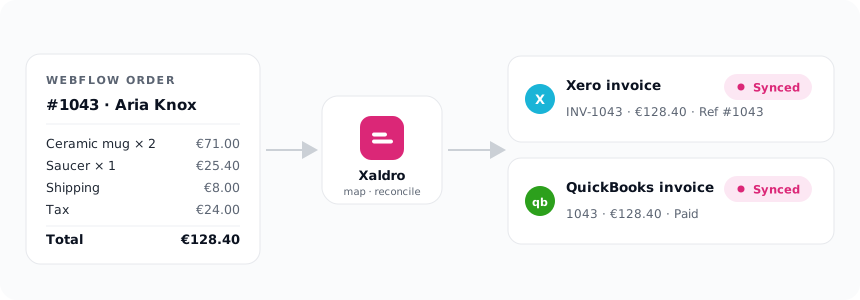
- One invoice per order, with one line per product at the correct quantity, unit price, and tax.
- Shipping as its own line, and discounts handled explicitly, so the breakdown matches reality.
- The Webflow order id written into the Reference field, so every entry traces straight back to its order.
- A reconcile-to-the-cent guard. Before anything posts, the invoice total is checked against what the customer actually paid. If the numbers do not line up, the order is held with a clear reason instead of posting something wrong. It never posts a wrong number.
- Refunds as credit notes in Xero and credit memos in QuickBooks, allocated against the original invoice, automatically when an order is refunded.
- Idempotent by design. Every order maps to exactly one invoice per accounting system. If a webhook is delivered twice or a sync is retried, you still get one invoice. It never double-posts.
The delivery is real time. Xaldro syncs through Webflow webhooks and keeps those webhooks healthy automatically, so you are not babysitting a connection. On install it runs a 90-day backfill so your recent history is already in your books, and it offers on-demand import going back up to 12 months when you need more.
Pricing is flat monthly: $19, $39, $79, or $199 depending on volume, with no per-task fees. The bill does not spike because you had a good month. You can start on a 14-day free trial or your first 100 orders, whichever comes first, with no card required.
Because the invoices, contacts, and credit notes are created inside your own Xero or QuickBooks organisation, removing the sync never touches your books. The data is yours, permanently.
When Zapier is still fine
To be fair about it: there are cases where a Zap is genuinely the right call.
- You sell one product at a time, with no shipping line, no discounts, and simple or no tax.
- You almost never refund, and when you do you are happy to handle it by hand.
- Your volume is low enough that per-task pricing stays cheap and duplicates are rare enough to catch by eye.
- You want a quick, throwaway connection and you are comfortable owning the maintenance when something changes.
If that describes you, a no-code workaround will carry you for a while, and there is no reason to over-engineer it.
Conclusion
The moment real carts arrive, the picture changes. Multi-line-item orders, shipping, discounts, tax, refunds, dedupe, and retries are not edge cases, they are the normal shape of ecommerce, and they are exactly where field-mapping tools break and where per-task billing gets expensive. A native sync maps line items correctly, reconciles to the cent, posts refunds as credit notes and credit memos, never duplicates, and charges a flat monthly rate instead of billing you per task. That is the whole reason Xaldro exists.